With the rising cost of electricity and increasing need for energy conservation, monitoring household power usage has become more important than ever. A Smart Energy Meter using Arduino offers a cost-effective and DIY solution for tracking real-time electricity consumption, identifying power-hungry appliances, and helping users save on bills.
This project uses an Arduino board with a current sensor (ACS712/SCT-013) to measure load current, calculates power usage, and displays data on an LCD screen. The system can also be enhanced with IoT platforms like Blynk/Thingspeak for cloud-based monitoring.
By building this system, you not only learn about embedded electronics but also create a practical tool that helps reduce electricity wastage and optimize energy use.

 Features of Smart Energy Meter Using Arduino
-
Real-time measurement of current, power, and energy usage.
-
Continuous monitoring of household electricity consumption.
-
LCD display for live usage data.
-
Calculation of energy in kWh (kilowatt-hour).
-
Extendable with IoT integration for mobile tracking.
-
Low-cost, scalable, and easy-to-build project.
Components needed for Smart Energy Meter:
| Component | Quantity | Description |
|---|---|---|
| Arduino Uno | 1 | Main microcontroller |
| MPU6050 | 1 | Accelerometer + Gyroscope for G-force detection |
| FSR402 | 1 | Force sensor for impact detection |
| GPS Module (NEO-6M) | 1 | Location tracking |
| GSM Module (SIM800L) | 1 | Sends SMS alerts |
| Buzzer | 1 | Optional buzzer for local alerts |
| Breadboard + Wires | 1 set | For prototyping |
| Power Supply (Battery or 5V) | 1 | For mobile use |
| SIM Card with credit | 1 | For sending SMS via GSM |
Working of Smart Energy Meter:
-
-
The ACS712/SCT-013 current sensor measures the real-time current flowing through an appliance.
-
Arduino reads the analog signal from the sensor.
-
Power is calculated using the formula:
P=V×IP = V \times I
(Where V = 230V AC supply, I = measured current).
-
Energy consumption is calculated as:
Energy (kWh)=P×t1000\text{Energy (kWh)} = \frac{P \times t}{1000}
(t = time in hours).
-
The LCD displays current (A), power (W), and total energy (kWh).
-
Optionally, data can be uploaded to the cloud (IoT dashboard) for remote monitoring.
-
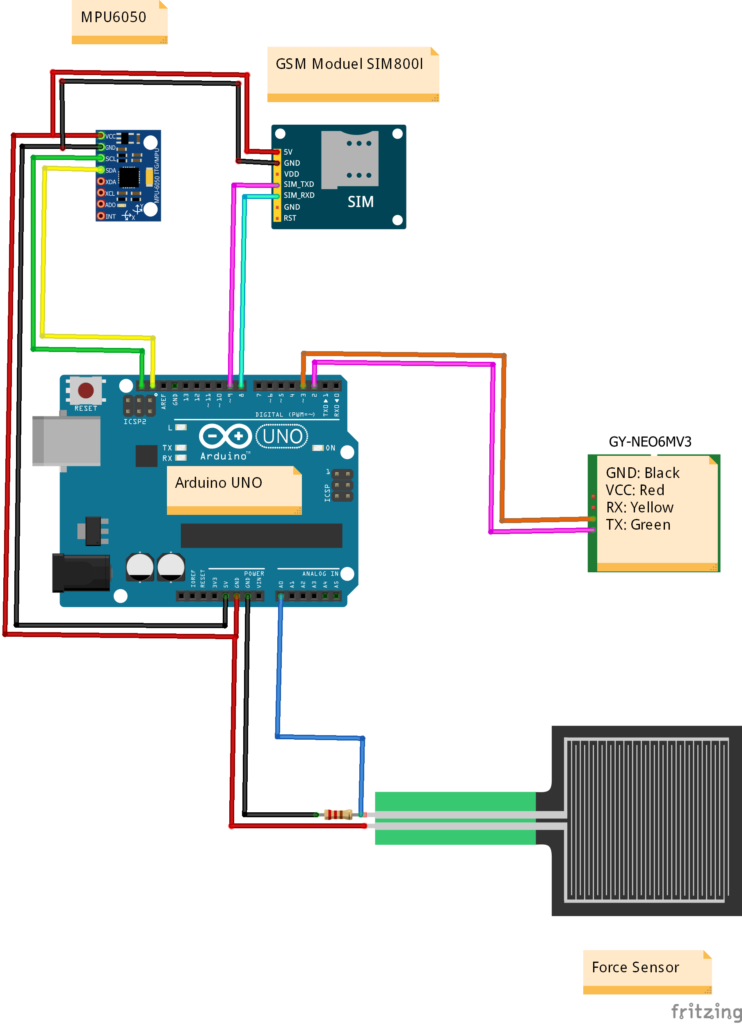
Circuit Diagram of Smart Energy Meter:
Arduino Code for Smart Energy Meter:
#include <LiquidCrystal_I2C.h>

// LCD setup
LiquidCrystal_I2C lcd(0x27, 16, 2);

const int sensorPin = A0;    // ACS712 output
float sensitivity = 0.100;   // 100 mV/A for ACS712-20A
float Vref = 2.5;            // No-current reference voltage
float mainsVoltage = 230.0;  // AC supply voltage

unsigned long lastTime = 0;
float energyConsumed = 0.0;  // in kWh

void setup() {
  lcd.init();
  lcd.backlight();
  lcd.setCursor(0, 0);
  lcd.print("Smart Energy Meter");
  delay(2000);
  lcd.clear();
  Serial.begin(9600);
}

void loop() {
  int adcValue = analogRead(sensorPin);
  float voltage = (adcValue / 1024.0) * 5.0;
  float current = (voltage - Vref) / sensitivity;
  if (current < 0) current = 0;

  float power = mainsVoltage * current; // in Watts

  unsigned long currentTime = millis();
  float elapsedTime = (currentTime - lastTime) / 3600000.0; // in hours
  lastTime = currentTime;

  energyConsumed += (power * elapsedTime) / 1000.0; // in kWh

  lcd.setCursor(0, 0);
  lcd.print("I:");
  lcd.print(current, 2);
  lcd.print("A P:");
  lcd.print(power, 0);

  lcd.setCursor(0, 1);
  lcd.print("E:");
  lcd.print(energyConsumed, 3);
  lcd.print(" kWh");

  Serial.print("Current: "); Serial.print(current, 2); Serial.print(" A, ");
  Serial.print("Power: "); Serial.print(power, 2); Serial.print(" W, ");
  Serial.print("Energy: "); Serial.print(energyConsumed, 3); Serial.println(" kWh");

  delay(1000);
}
Future Improvements in Smart Energy Meter:
-
-
Add Wi-Fi/IoT module (ESP8266/ESP32) to push data to cloud dashboards.
-
Integrate with mobile apps (Blynk/Thingspeak) for smartphone monitoring.
-
Implement billing calculation based on local electricity tariff.
-
Add relay-based cut-off for load management in case of overload.
-
Applications of Car Crash Alert System:
-
Household Power Monitoring → Track and reduce electricity wastage.
-
Industrial Use → Monitor machine-level consumption for optimization.
-
Educational Projects → Great for IoT, embedded systems, and power electronics learning.
-
Renewable Energy Systems → Monitor solar/wind energy usage.
Conclusion
The Smart Energy Meter using Arduino provides an affordable and effective solution to track real-time power consumption and energy usage. By displaying current, power, and kWh on an LCD (and optionally sending data to the cloud), this project makes it easier to monitor and optimize electricity usage.
This project is ideal for students, IoT enthusiasts, and homeowners who want to understand and reduce energy costs. With further IoT integration, it can easily become a part of modern smart home automation systems.
Need This Project?
If you need this Project with or without Modifications or Customization then you can contact us through WhatsApp. We can deliver you this Project in the Following Ways.
Project Code:
we can provide you Project Code along with Zoom Assistant, through Zoom meeting for Setup of this Project or any other Arduino Project of your need.
Fully Functional Project with Hardware/Components Shipment:
if you can not make this project yourself then you can use this option. We will assemble the Project and will ship it to your Doorstep with Safe Packaging.
Learn More about the services we offer.